
The BMW Service Indicator System helps you plan maintenance. On models with Condition Based Service (CBS), read the individual due item and date. A service reminder does not replace an oil-pressure, overheating, or brake-system warning that requires immediate action.
By Ahmad, BMW Garage.
Service reminder or safety warning
Start with the full message, not the symbol alone. An overdue entry in the service menu and a warning while driving can use similar colors but call for different decisions.
| What you see | What it means for you | Next action |
|---|---|---|
| A named service item with a due date or distance | Maintenance is approaching or overdue. | Identify the item and arrange the required work. A reminder alone does not diagnose a failed component. |
| An engine oil-pressure warning | Lubrication may be inadequate. | Stop safely, switch off the engine, and arrange assistance. Do not treat it as permission to top up and continue. |
| An overheating message instructing you to stop | The engine needs immediate protection. | Stop safely and switch off as instructed. Do not open a hot cooling system. |
| A brake-system stop warning, sinking pedal, fluid leak, or reduced braking | The car may be unsafe to drive. | Stop safely and arrange recovery. Do not reset the message or drive to test the brakes. |
An oil-level instruction is also different from an oil-pressure warning. Follow the exact message and the procedure for your engine. Adding oil does not establish that pressure is safe, and a routine oil change is not a diagnosis.
BMW malfunction warnings need the message, symptoms, and relevant checks considered together. If you cannot identify a warning confidently, get advice before continuing the journey.
How BMW CBS tracks maintenance
CBS combines service calculations and recorded information to forecast selected maintenance needs. It is not a live laboratory test of every fluid, filter, seal, and brake component. The items available depend on the vehicle and its software.
BMW’s 2025 US maintenance booklet distinguishes dated tasks, distance-related tasks, and work combined with particular oil services. It is a useful example of the structure, not the maintenance schedule for every UAE or imported BMW.
| Basis | Example | What to check |
|---|---|---|
| Elapsed time | Brake fluid is shown by date in the 2025 US booklet. | The applicable due date and actual replacement record, even with low annual mileage. |
| Time and use | Engine oil can have a date and remaining distance. | Both limits. Do not assume remaining kilometers cancel an approaching date. |
| Associated or separately scheduled work | Filters and spark plugs may accompany specified oil services without their own dashboard entry. | The maintenance schedule for the engine, production date, and market. |
A clean-looking service list does not show that every maintenance task has been completed. In particular, do not assume a cabin-filter reminder measures dirt directly or that a brake estimate measures the thickness of every pad.
Brake wear still needs physical inspection when indicated. Noise, pulling, vibration, or a changed pedal should be reported even when the service screen shows no due brake item.
Why BMW service displays look different
The term service indicator covers several generations of BMW maintenance displays. A procedure written for an older instrument cluster may have little in common with a newer iDrive menu. Start with the actual vehicle, not a video that happens to show the same model name.
Older instrument-cluster displays
Older BMWs can show service-interval lights and inspection or oil-service information in the cluster. These are not the same interface as an itemized CBS screen. Use the original owner’s manual and maintenance documentation to interpret the display. If the lights behave unexpectedly, a workshop should identify the cause rather than bridge terminals or try an unrelated reset sequence.

Itemized iDrive service information
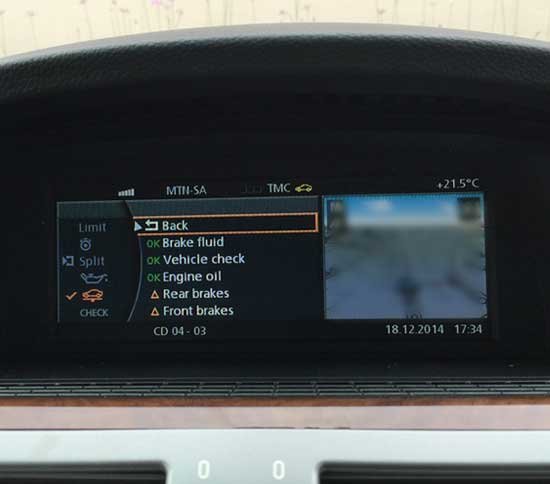
An older iDrive CBS screen can list brake fluid, vehicle check, engine oil, and front and rear brakes separately. The E65 example above shows why opening the individual item matters: an overall impression of “service due” loses the distinction between different jobs. Its historical screen is an illustration, not a schedule to copy.
Newer touchscreens and Vehicle Status menus
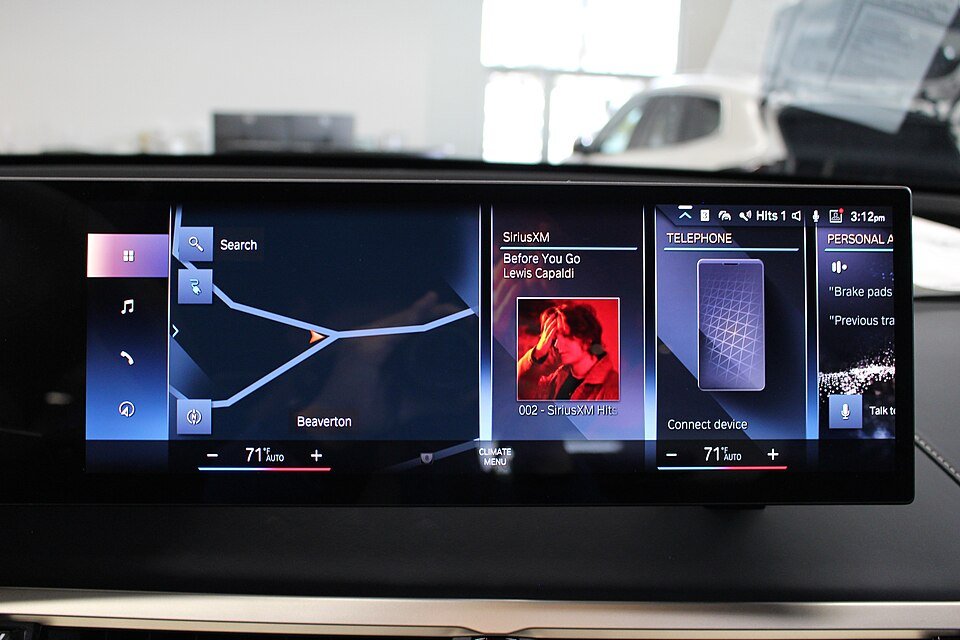
A newer display may organize the same owner question through apps or a different menu layout. The iDrive 8 photograph in the reading section below shows the central interface in a BMW iX M60, not its service requirements screen. Find the vehicle’s maintenance information using its own manual. A navigation or media screen does not establish whether maintenance is current.
BMW AGMC’s instructions for finding service requirements describe selecting Vehicle status and then an individual service entry. Menu wording varies. If your car does not match, do not assume the function is absent or use controls intended to reset the service counter.
How to read due items
Check the display while parked safely. Menu names vary across BMW generations, so use these steps to find the information rather than assuming every car has the same screen.
- Open the vehicle information area. Depending on the model, this may be labeled Vehicle Info, CAR, or the Vehicle Status app.
- Find Vehicle status, then Service required, Required services, or Service schedule as applicable.
- Select each listed item. Note its name, due date, remaining distance, and any explanatory message.
- Compare the entries with invoices and the maintenance record. Photograph the screen while stationary if you need help interpreting it.
Read Check Control messages separately from scheduled service entries. The service screen can help plan an appointment; it cannot overrule a stop instruction elsewhere on the dashboard.
For the exact controls, enter your vehicle identification number (VIN) in the BMW Driver’s Guide. This supplies vehicle-specific operating information for supported models, including explanations of warning lamps.
If the menu differs, search the car’s integrated manual for service requirements. Older vehicles may use a different service-interval display. Do not follow a reset sequence for another generation just because the badge matches.
Build a service work list
Record each entry on its own line before requesting a quote. Include the unit shown on the screen: a distance in miles is not the same figure in kilometers. Imported vehicles can have settings or records that differ from what their current owner expects. Also record the current odometer reading so the workshop can compare the screen with previous invoices.
Use three columns: the named item, the displayed deadline, and evidence of its last completion. That simple comparison helps distinguish genuinely due maintenance from a record that needs checking. It also avoids buying an entire package merely because one service entry has changed color.
| Service information | Useful question | Evidence to request |
|---|---|---|
| Engine oil date and distance | What oil specification and associated work apply to this engine at this service? | An itemized scope identifying oil, filter, and any additional scheduled tasks. |
| Brake-fluid date | When was the fluid actually renewed, and which product is required? | The previous invoice and current vehicle-specific fluid requirement. |
| Brake wear information | What do the measured pad and disc conditions show? | Inspection findings for the relevant axle, including uneven wear where present. |
| Vehicle check | Which inspection operations are included for this model? | The applicable checklist and completed findings, not just a reset receipt. |
| An unfamiliar inspection entry | Is this a maintenance task or an entered inspection reminder? | The manual explanation and the relevant local requirement, if any. |
A dashboard entry should not be treated as proof that a registration inspection has been passed. Likewise, passing an external inspection does not establish that the manufacturer’s scheduled maintenance was completed. Keep each record for its own purpose.
How to handle a changing distance estimate
A forecast is not a promise that every future journey will consume the same amount of its remaining distance. Record a surprising change and discuss it with the workshop alongside your driving pattern and service history. Avoid diagnosing a sensor or control unit from the countdown alone. A screenshot from last month and one from today are useful evidence; an unexplained reset removes that comparison.
If the car has a separate warning or a new symptom, report it independently. For example, a car can have time remaining before its next oil service and still develop a leak. Maintenance scheduling and current fault assessment answer different questions.
Due, overdue, and missing items
A due-soon notice helps you schedule the named work. An overdue notice means that deadline has passed. Neither tells you how many extra kilometers are safe, and this article does not set a grace period.
- Due soon with no symptoms: confirm the work required and arrange service before the applicable deadline.
- Overdue: contact the workshop promptly with the item and amount overdue. Follow any separate warning immediately.
- Missing item: check the vehicle’s schedule and records before concluding the work is unnecessary.
- Unexpected date after storage or a reset: ask for the date and service history to be reconciled.
For example, a hypothetical owner may see distance remaining for engine oil but an earlier brake-fluid date. Those entries represent separate tasks. Waiting for the oil service could miss the fluid deadline.
Brake fluid replacement needs the correct fluid specification and documented service timing. Its due date is separate from a low-fluid warning or a braking complaint.
Dubai traffic and your actual driving pattern belong in the service discussion. They do not establish a universal shorter interval. Ask what vehicle instruction, inspection finding, or documented use condition supports any recommendation for earlier work.
Reset only after completed work
A reset changes the maintenance record used by the display. It does not change oil, renew brake fluid, replace worn pads, or repair a fault. Reset only the applicable item after its work is complete, using the procedure for that BMW.
If a reminder remains after service, start with the invoice and the exact displayed item. The work may concern a different entry, or the completed task may need its correct reset. A recurring warning still requires diagnosis.
- Confirm what was actually performed, including associated filters or other scheduled work.
- Record the completion date and mileage before changing a service entry.
- Have the workshop verify the applicable reset and resulting due information.
- Keep the invoice. A green status alone is not proof of the work or a complete service history.
Do not clear every item to make the screen look reassuring. If an entry was reset accidentally, tell the workshop exactly what happened so it can compare the display with reliable maintenance records.
Resolve service history mismatches
The display is most useful when the starting information is trustworthy. When buying a used BMW, compare the VIN, dates, mileage, and listed operations across invoices and available service records. A screen showing no overdue items cannot tell you which oil or brake fluid was used, whether an associated task was omitted, or whether someone reset an entry early.
Ask for evidence of the individual work rather than a general statement that the vehicle was “fully serviced.” A dated invoice for engine oil does not prove that spark plugs, brake fluid, or a vehicle check were included. Missing paperwork is a reason to establish a maintenance baseline with the workshop, not proof that every component requires replacement.
After an accidental reset
Write down which entry changed, when it happened, and the displayed mileage or date before and after if available. Keep the most recent genuine service invoice. Ask the workshop to reconcile the maintenance data using the applicable BMW procedure. Do not perform another reset to guess your way back to the old value.
If the last completion date cannot be established, ask the advisor to explain the options and their basis. The decision may differ between a time-sensitive fluid task and a replace-on-condition component. An estimate made from reliable records should be identified as an estimate, not silently presented as a documented completed service.
After storage, battery work, or a software visit
Review the due items when the car returns to use. Report any date or distance that is inconsistent with your records. Explain the storage period and any battery disconnection, but do not assume that all vehicles lose the same information or that a changed display proves a defective battery. The technician should check the actual system and its instructions.
A software update is not a substitute for carrying out overdue maintenance. If a workshop says that programming or a display correction is necessary, ask which issue it addresses and whether the maintenance itself remains due. Keep that explanation separate from the invoice for physical service work.
If a completed item will not reset
First confirm that the displayed item matches the work performed. Then let the workshop check the vehicle-specific prerequisites and any relevant faults. Repeatedly forcing a reset, clearing unrelated codes, or replacing a sensor solely because a generic procedure failed is not a sound next step. Ask for the reason the reset is unavailable and the evidence behind any proposed repair.
What to take to the workshop
Bring the model, year, mileage, relevant invoices, and a stationary photograph of the complete message. Describe any noise, leak, vibration, or change in driving behavior separately from the scheduled service request.
Ask the advisor to separate due maintenance from any diagnostic investigation. You should be able to see which work follows the schedule, which finding supports a repair, and which optional work needs your approval.
Build the appointment around your actual needs
For a routine reminder with no symptoms, send the due-item information before your visit and request the corresponding maintenance scope. If there is also a running problem, warning, or leak, explain that separately so the workshop can allow time for diagnosis. Do not describe an oil-pressure warning simply as “oil service due,” because that can hide the urgency of the situation.
Ask whether the quoted total includes consumables, required associated tasks, the correct service reset, and VAT. Agree any diagnostic fee before additional investigation begins. No single service price can be inferred from the reminder alone because the engine, scheduled operations, and completed history determine what is needed.
At collection, compare the invoice with the work you approved. Open the relevant service entries while parked and check the resulting information with the advisor. Keep outstanding work visible on the record instead of asking for every reminder to disappear. If the workshop recommends deferring an item, ask for its reason and any limits in writing.
For help assessing an unfamiliar workshop, compare diagnostic fees and written service quotes before authorizing work. The useful outcome is a clear record of what was required, what was completed, and what still needs attention.
Service indicator questions
Does a red service entry always mean stop the engine
No. An overdue entry in the maintenance menu is different from a stop warning. Read the full text and context. Oil-pressure, overheating, and brake-system stop instructions take priority over the service schedule.
Can an electric BMW need brake fluid service
Yes. An electric drivetrain does not remove the hydraulic brake system’s maintenance needs. Follow that vehicle’s schedule; do not apply a combustion-engine oil-service checklist to it.
Should I pay for a full diagnostic scan for an ordinary reminder
A routine reminder alone does not prove that fault diagnosis is needed. Confirm the due item first. Symptoms, an unexplained message, inconsistent records, or a reset problem can justify a separate investigation with an agreed scope.
Does a vehicle check mean every fluid will be changed
No. A vehicle check is an inspection task whose scope depends on the applicable schedule. Ask for the checklist and findings. Fluid renewal, worn-part replacement, and repairs should be identified separately on the approved work order.
Can I wait for a warning before replacing a filter
Do not assume that every filter has a direct condition sensor or its own displayed reminder. Check the scheduled work for the exact engine and service occurrence. Report poor airflow or other symptoms separately instead of using them as a substitute for the maintenance record.
Use CBS to plan the correct maintenance, keep records of completed work, and respond to safety warnings on their own terms.
Need help with your BMW?
Tell the garage what you have noticed, what you want checked and which BMW you drive. The team can explain the sensible next step before you book.